Copilot Analytics
Measure whether the AI's suggestions and drafts are used: how many were accepted, edited or rejected, on which surface, and how far edited drafts were changed before sending.
Written By Chris Scaminaci
Last updated About 3 hours ago
When a technician responds to a suggestion or a draft, QuantumOps records whether it was accepted, edited or rejected. Copilot Analytics counts those responses across every copilot surface. It answers one question: are the AI's suggestions helping, or are people rewriting or discarding most of them?
Before you start:
- You need the Administrator role. Anyone else gets an access-denied page. See Access denied and sign-in errors.
- This page has no sidebar link. Open it by adding
/analytics/copilotto your QuantumOps address. - The page only has data when people respond to suggestions. See Where the data comes from.
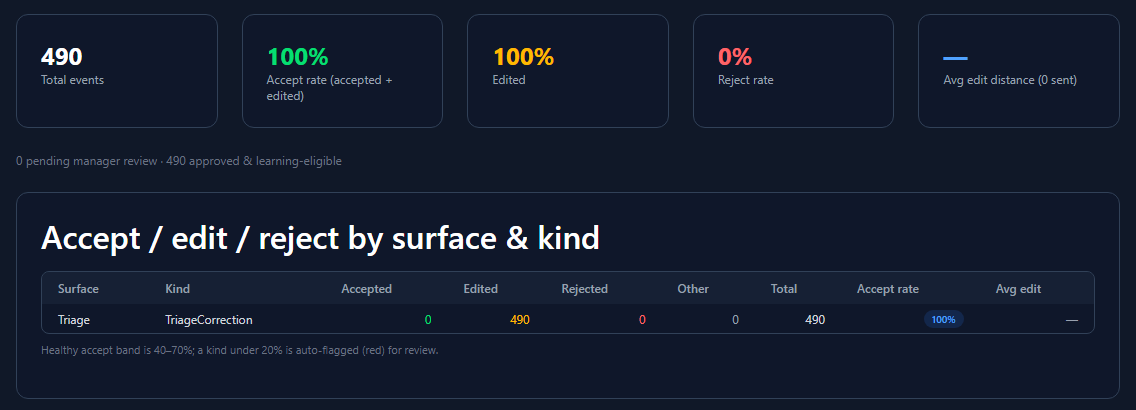
What the page covers
The totals, the tiles and the table cover the last 90 days. The two charts at the bottom cover the last 30 days. Select Refresh to read the data again.
When there is no data, the page says "No copilot feedback captured yet in this window." If the feedback data cannot be read at all, it shows a warning that feedback analytics are unavailable.
Read the summary tiles
The three outcomes are:
- Accepted: used as generated. A thumbs-up counts as accepted.
- Edited: changed, then sent.
- Rejected: discarded. A thumbs-down, or marking a suggestion outdated, counts as rejected.
Any other response is counted as Other in the table below.
The accept rate counts accepted and edited together. It measures whether a draft was useful, not whether it was perfect. A draft that saved the blank page and was then reshaped still counts. The Reject rate is the figure that tells you suggestions were not worth reading.
Under the tiles, a line reports how many events are pending manager review and how many are approved and learning-eligible. When Enable Manager Review is on, which is the default, new feedback waits as pending until a manager approves it. Only approved feedback is used to tune later suggestions for your organisation, so a large pending number means feedback is being collected but not yet used. See Override and feedback review to approve it, and Dispatch workflow and scheduling settings for the setting.
Compare surfaces and kinds
The table headed "Accept / edit / reject by surface & kind" has one row for each combination, with the largest first.
The accept rate is shown in a coloured badge: red below 20%, amber from 20% to 40%, green from 40% to 70%, and cyan above 70%. The page prints its own guide under the table: a healthy accept rate is 40–70%, and a kind under 20% is flagged red for review.
Acceptance is rarely even. If one kind of suggestion has a low accept rate while the others do well, the problem is that kind of suggestion, not AI help in general.
Follow volume and edit distance
- Feedback volume (daily) shows how many responses were recorded on each of the last 30 days, with a bar and a count. Check it first. A low or empty chart can mean few people are responding, or that responses are not being recorded.
- Edit-distance trend (sent drafts) shows the daily average edit distance of sent drafts. It appears only when at least one day has an edit distance. A falling line means people change the drafts less over time.
Days are counted in UTC.
Where the data comes from
QuantumOps records a response whenever someone acts on an AI output:
- Suggested actions and reply drafts on HaloPSA tabs: approving, editing before sending, or rejecting. See Copilot suggestions and reply drafts.
- Ratings on research findings and on the memory chips in live context: thumbs up, thumbs down, or marking a fact outdated. See Sherlock research and live context.
- Triage corrections: when a dispatcher changes the triage recommendation, in the Ticket Triage Dashboard or in the browser extension. These appear on the Triage surface as edited.
HaloPSA tabs record ratings, chips and suggested actions only when the tab carries your organisation's tenant tab key. Without the key those tabs are view-only. An organisation that has not set up a tab key therefore sees little or no data from them.
Approving or editing a suggestion also needs a verified agent identity (Tier 2 · verified). Rejecting a suggestion and rating findings or memories need only the tab key (Tier 1 · feedback). An organisation whose agents never verify therefore sees no accepted or edited suggestions from the tabs. See Copilot suggestions and reply drafts.
To set up the tab key, see Adding QuantumOps tabs to HaloPSA.
Related pages
- Copilot suggestions and reply drafts: the suggestions this page measures.
- Override and feedback review: approve feedback so it can teach the AI.
- Adding QuantumOps tabs to HaloPSA: set up the tab key.
- AI Usage Analytics: what the AI costs, next to whether it is used.
Was this helpful?
Still need help? Ask the team